Auto Accept Vs Manual Accept Order Guideline
This article explains how Auto and Manual Accept settings on the Otter tablet and POS affect order confirmation and the flow of new orders between the tablet and POS.
Auto / Manual Accept Guidelines
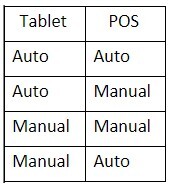
Auto – Auto: No confirmation, new order notifies tablet but is automatically sent to POS without confirmation on tablet or POS.
Auto – Manual: New order notifies tablet but is automatically sent to the POS without confirmation, but will require confirmation on the POS
Manual – Manual: New order notifies tablet and requires first confirmation, then order is sent to POS after confirmation where a second confirmation is required on the POS.
Manual – Auto: New order notifies tablet and requires confirmation, then order is sent to POS and does not require a second confirmation.
NOTE: Setting tablet to manual is the only way to adjust prep time before confirming with Otter.