Browse Menu
This guide explains the menu screen of CloudPOS Mobile and how to browse the categories and items.
CloudPOS Mobile > HOME > TABLES > Select a table > ORDER
Menu Screen:
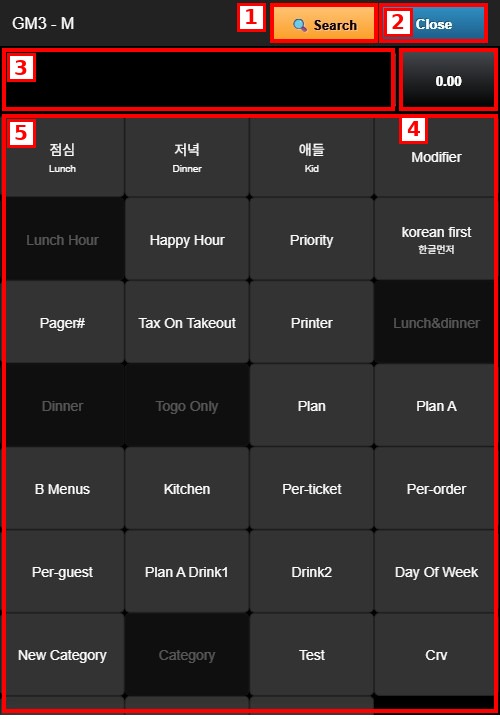
1. SEARCH: Searches for an item by name.
2. CLOSE: Closes the menu and returns to the ticket.
3. ORDER FIELD: Displays the items added to the current order.
4. ORDER TOTAL: Displays the current total of the order.
5. MENU CATEGORIES: Tap a category to display its items. The categories available depend on the restaurant configuration.
Menu Items:
After selecting a category, its items are displayed. Each button shows the item name and price.
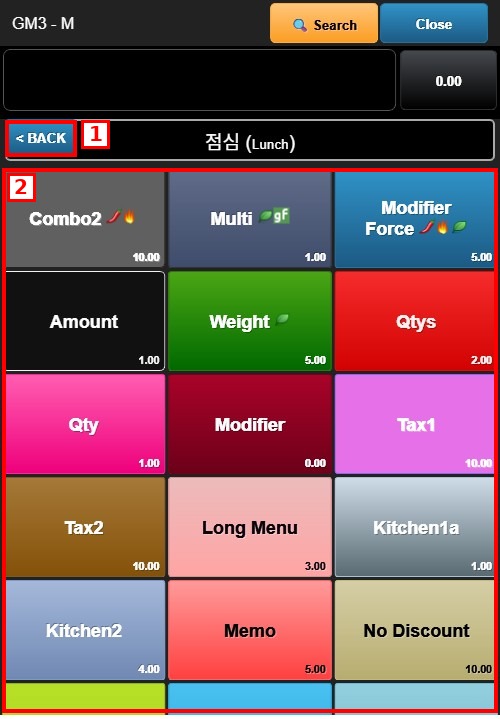
1. BACK: Returns to the category list.
2. MENU ITEMS: Tap an item to add it to the current order.