Modifier Structure
Understanding the Modifier Structure is essential before creating and configuring modifiers in VeronaPOS. Similar to the Menu Structure, modifiers follow a hierarchy that organizes customization options and determines how they are presented when ordering menu items.
The modifier structure follows this hierarchy:
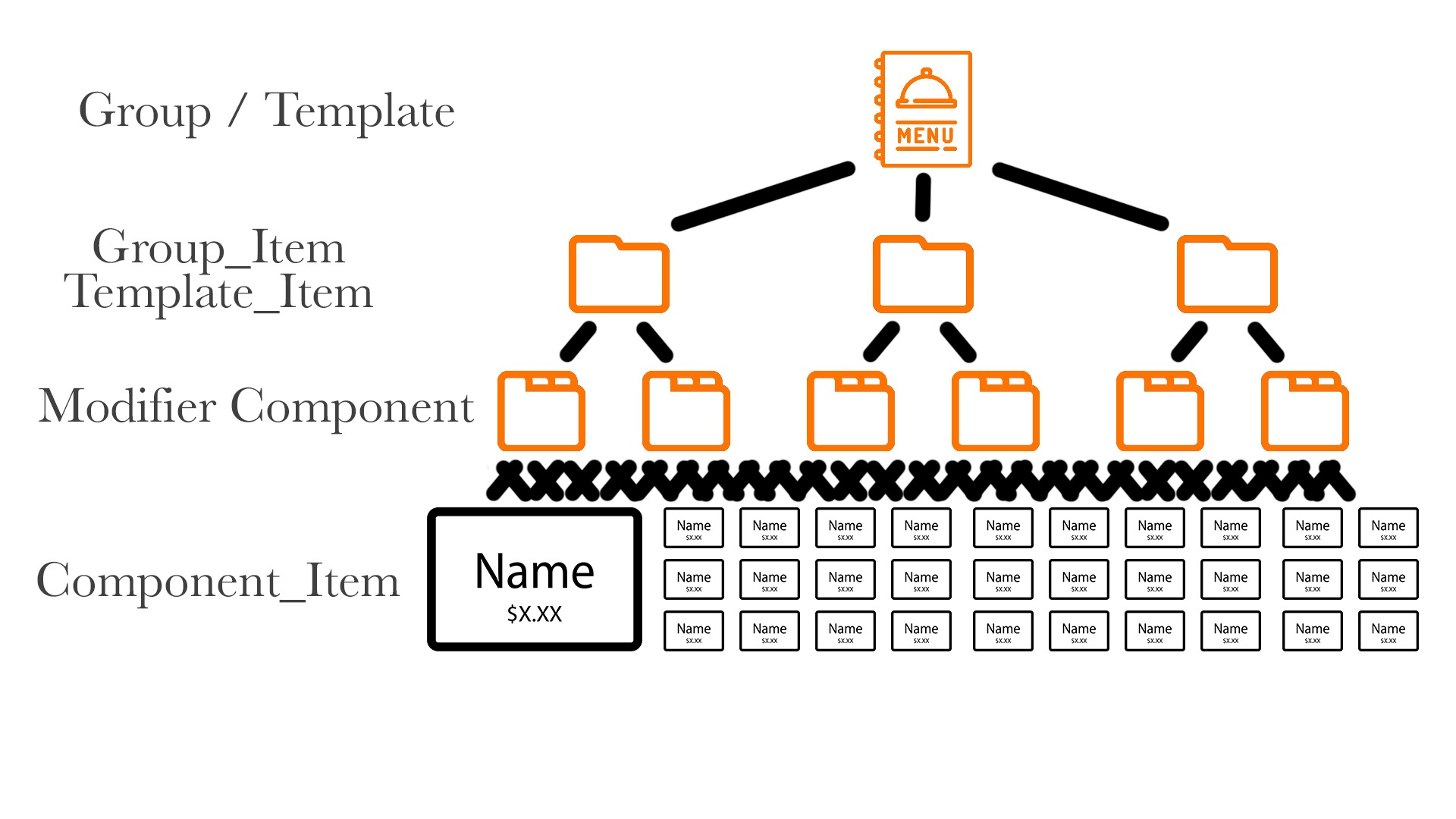
For a visual explanation of the VeronaPOS modifier structure, watch Modifier Structure Video Guide (Click here)
Group List/Template List
The Group List, also referred to as the Template List, is the top level of the modifier structure. Users can create as many groups or templates as needed to organize different sets of modifier options.
Group Item/ Template Item
Multiple Group Items or Template Items can be created within a Group or Template List.
A Group Item provides an additional layer for importing and configuring Modifier Components with settings specific to that modifier group.
Modifier Component
Modifier Components define the individual modifier options that can be assigned to a modifier group. Each component contains its own set of selectable options.
Component Item
Each Modifier Component contains multiple Component Items. These are the individual options that can be selected when the modifier is presented during ordering.
This structure allows modifiers to be organized and reused efficiently across different menu items while providing flexibility in how customization options are configured.
Index: