Home Screen
The Home Screen is the first screen displayed after logging in to CloudPOS Mobile. From here, employees can access every ordering and ticket function of the app.
CloudPOS Mobile > Log in > HOME
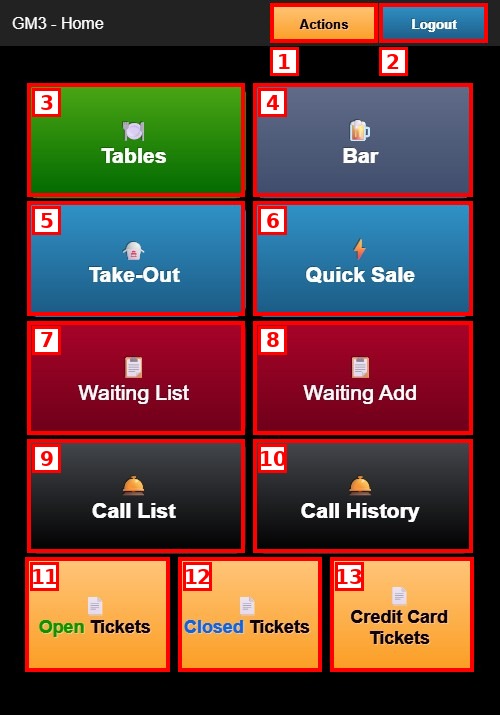
1. ACTIONS: Opens the Actions menu.
2. LOGOUT: Logs out the employee and returns to the login screen.
3. TABLES: Opens the table map for dine-in orders.
4. BAR: Opens bar tab ordering.
5. TAKE-OUT: Opens take-out order management.
6. QUICK SALE: Opens a quick counter sale.
7. WAITING LIST: Displays the current guest waiting list.
8. WAITING ADD: Opens the form to add a guest to the waiting list.
9. CALL LIST: Displays the list of guests to be called.
10. CALL HISTORY: Displays the history of guest call-outs.
11. OPEN TICKETS: Displays all currently open (unpaid) orders.
12. CLOSED TICKETS: Displays all completed and paid orders.
13. CREDIT CARD TICKETS: Displays the orders paid by credit card.
Actions Menu:
Tap ACTIONS to open the Actions menu.
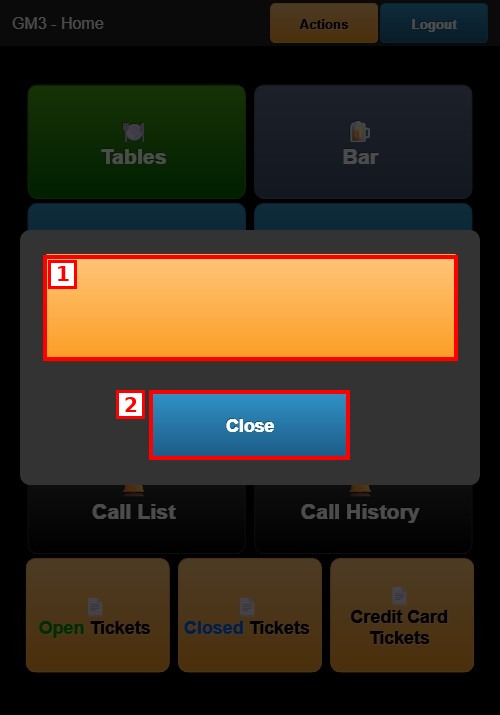
1. ADMIN: Gives access to the administrative functions.
2. CLOSE: Closes the Actions menu and returns to the Home Screen.